Get Started
Introduction
The physical computing bridge (PhyCom bridge) provides a platform from hardware as well as software side environment to achieve physical computing scope.
PhyCom is platform which have server side implementation of firmata, client-server (request-response) model in its MCU. This PhyCom is controlled by a host computer. This host computer acts as client in this client-server model.
The communication link between PhyCom and host computer is achieved via serial communication, On host side this link enumerated as a COM port with the help of USB-To-Serial bridge. The data transfer is binary in nature and if of full duplex type. On server side, we have pre-burned firmata image which exposes firmata API over COM port. On client side we uses PhySyncFirmata, a package to send commands to (request), and receives response from PhyCom Hardware side
What You Need
PhyCom Board
USB cable
Sensors with kit
PhyCom Board Overviews
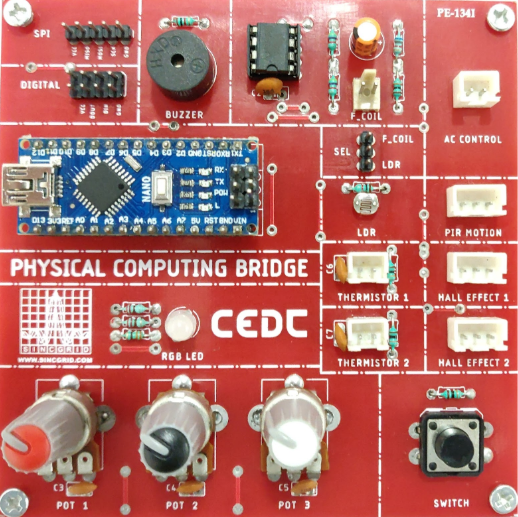
Installation Step by Step
Setting up Development Environment
To install python library use following command
pip3 install physyncfirmata
To install jupyter, use following commands
pip3 install jupyter
Creating Your First Project
# selecting a board
from phySyncFirmata import ArduinoNano
# selecting the port
board = ArduinoNano('COM40')
PIN = 6
board.digital[PIN].write(1)#high
board.digital[PIN].write(0)#low
Note
The pin 6 is blue led from RGB led.